Photo Frame Dashboard
A 10.1-inch Wi-Fi photo frame, the kind that cycles through family pictures, that I opened up and gave a new job. It shows my day now: my calendar, the weather, the markets, where my car is and how much Claude I have used. It still runs the frame's own Android 6, and the page comes from a Cloudflare Worker, so no computer has to be on.
Everything private in these pictures is made up: the calendar, the location, the car's position and the account names. The rest is the real thing.
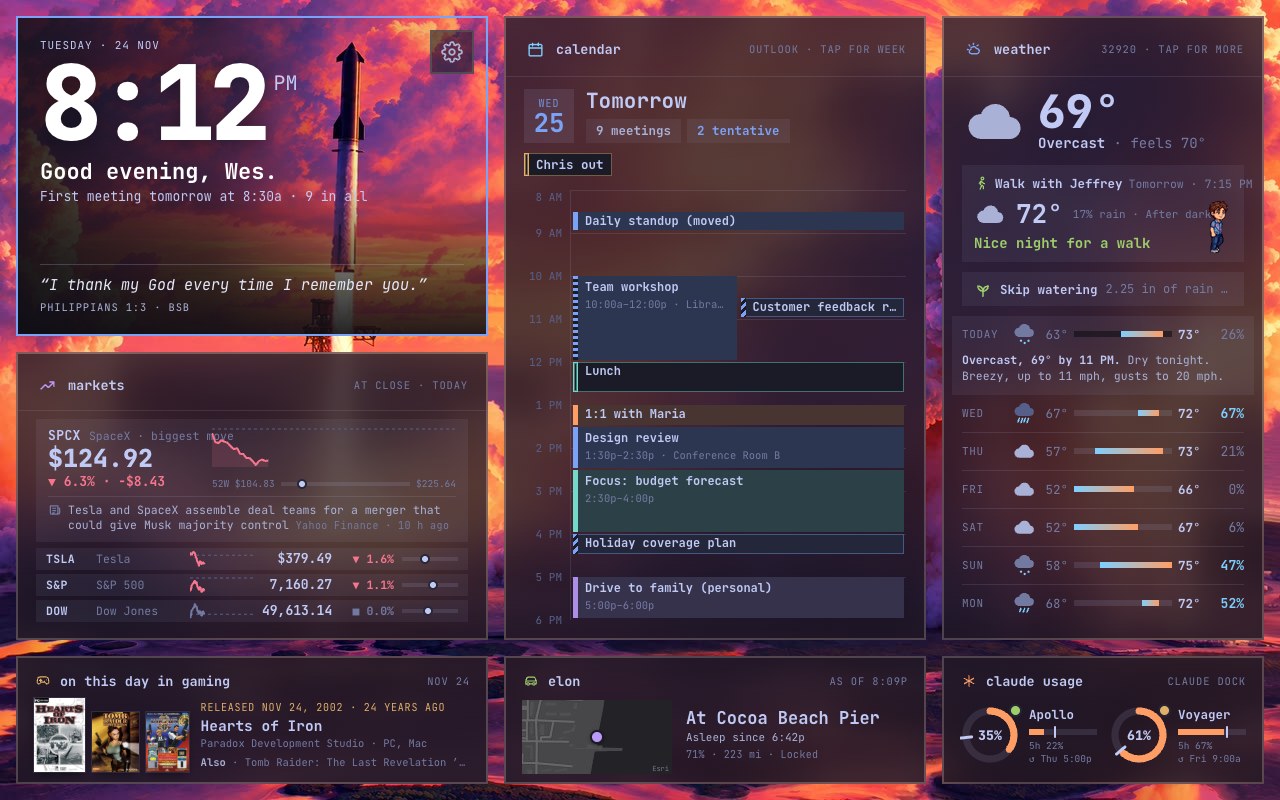 The home screenTokyo Night, 8:12 PM
What's on it
The home screen is seven tiles. Two of them open into a full screen when I tap them.
- Clock
- The time, a greeting, my next meeting and a verse of thanks that changes every day. After 5 PM the meeting line becomes the evening walk.
- Calendar
- Today as a day grid, coloured by busy, tentative, free and out of office. Once today's meetings are over it shows the next day that has any.
- Weather
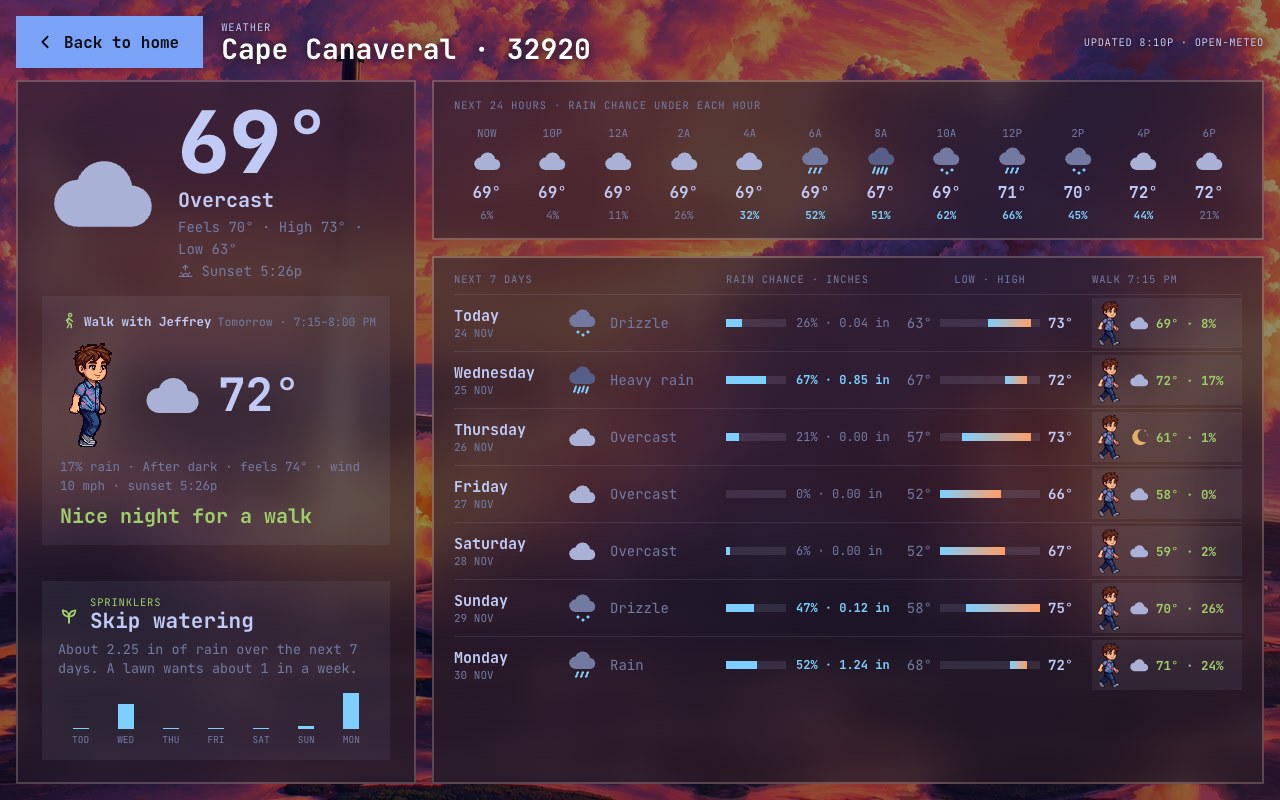
- Now, the week ahead, a sentence about today in plain words, and whether the sprinklers should run.
- Markets
- The day's biggest mover gets the big spot: price, change, the day's line, where it sits in its 52-week range and a headline. Three more sit under it as rows.
- Car
- Where my car is on a small map, its charge and whether it is locked. The reading comes from Mac Tesla Tracker, another thing I built.
- On this day in gaming
- The best-known game first released on today's date between 1980 and 2006, with its box art and a few more from the same day.
- Claude usage
- A ring for each account's week and a bar for its current five-hour window.
How everything gets to the frame
The frame itself does very little. It opens one web page and asks for fresh numbers every minute or two. A small program in the cloud does the fetching, and my Mac adds the two things only it knows.
1 · Where it comes from
Out on the internet
- The weather
- Open-Meteo
- The markets
- Yahoo Finance
- Game history
- Wikidata and Wikipedia
- The daily verse
- a free Bible API
- My calendar
- a private link only the Worker knows
The Worker fetches these and keeps a copy
On my Mac
- Where my car is
- Mac Tesla Tracker
- My Claude usage
- a small usage app
My Mac sends these, checking once a minute
2 · In the cloud
A Cloudflare Worker
One small program that is always on.
- Checks for the key. No key, no dashboard.
- Trims my calendar down to the days that matter.
- Answers from its copies, so the frame never waits on a slow source.
The frame asks again every minute or two
3 · On the wall
The photo frame
- A kiosk app opens the one page when it boots.
- The page draws the seven tiles and works out my repeating meetings.
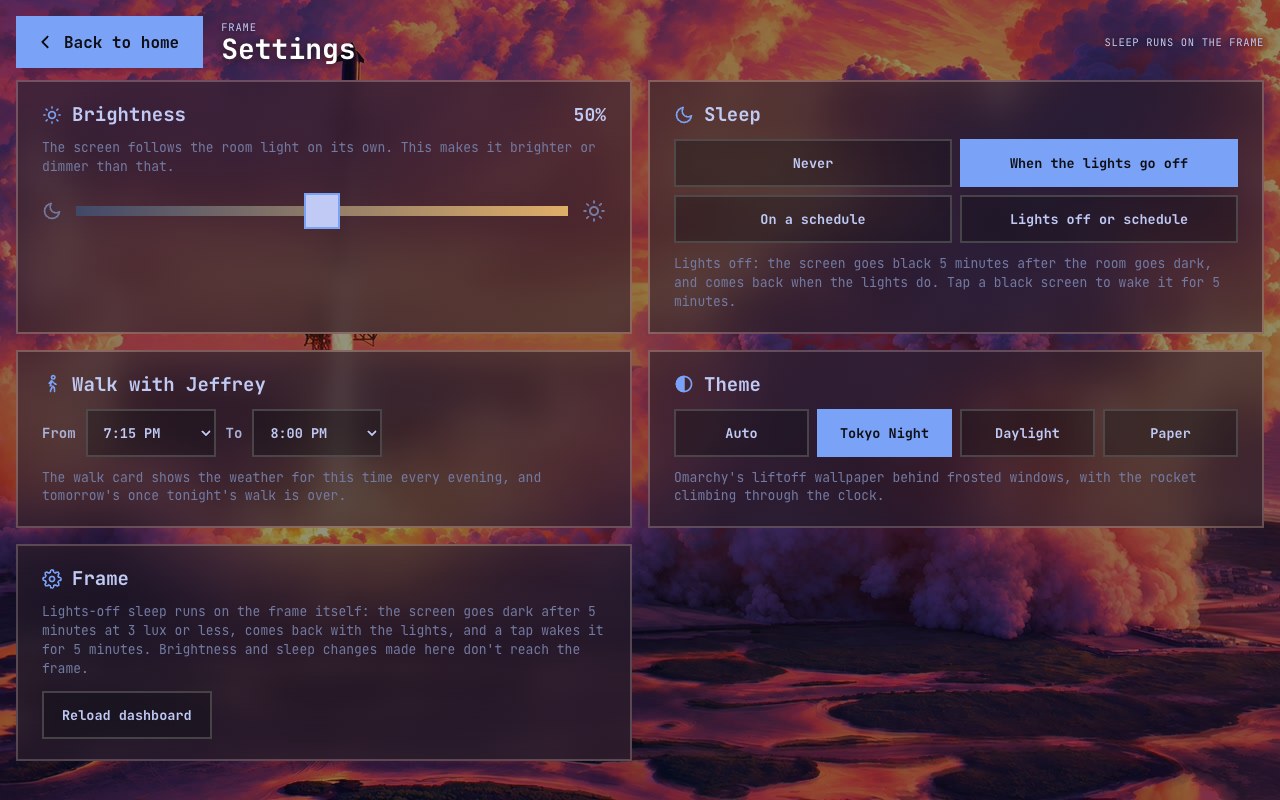
- A light sensor and a small script turn the screen off when the room goes dark.
When I change something
I publish a new version, the Worker starts serving it, and within five minutes the frame notices and reloads itself. Nobody touches the frame.
Three looks, and one that follows the sun
The first look was Paper: white tiles on graph paper, like this site. Tokyo Night, the one at the top of this page, borrows Omarchy's Tokyo Night theme and its liftoff wallpaper, with the rocket climbing through a clear clock window. Daylight is the same layout over the launch in daylight colours. Auto switches between the two: Daylight from sunrise to sunset, Tokyo Night after dark. The frame works out sunrise and sunset itself, to within a few minutes.
The frosted glass is a trick. This frame can't blur anything live, so each window sits on a copy of the wallpaper that was blurred ahead of time and lined up behind it.
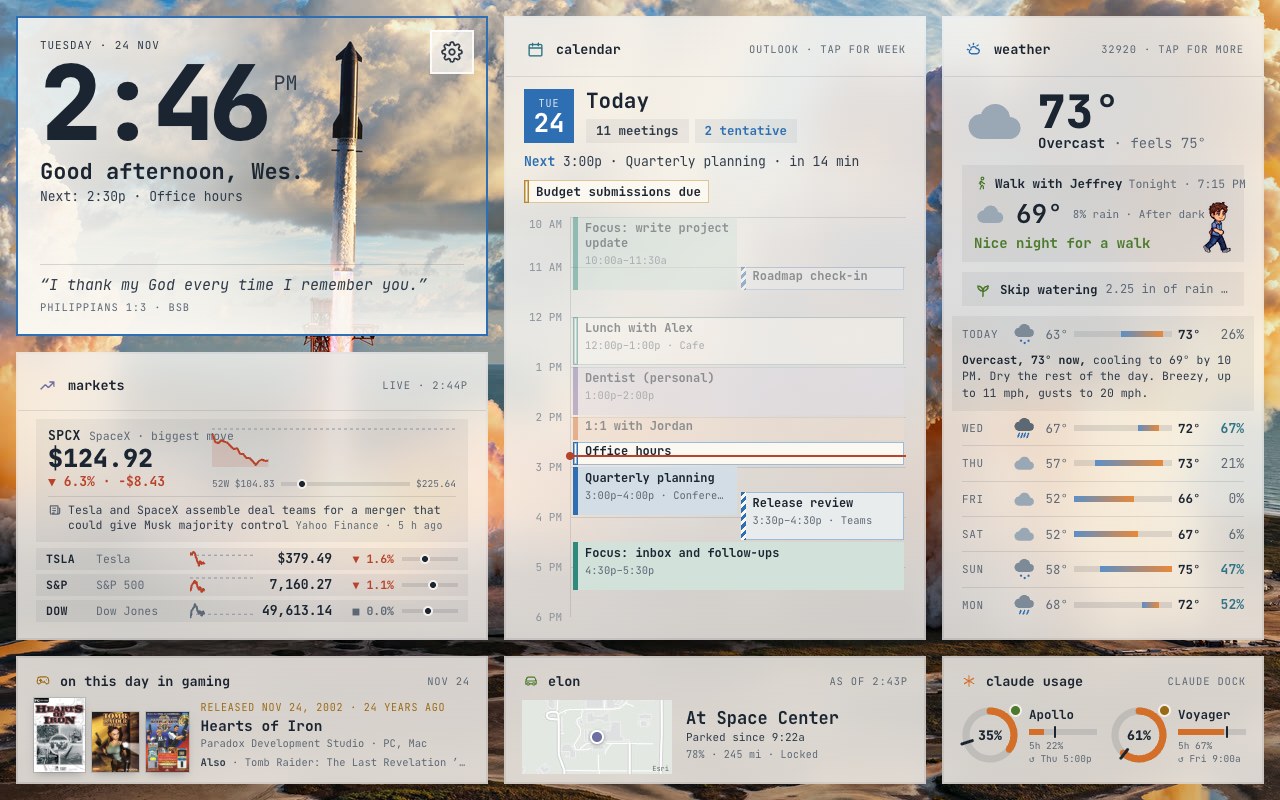
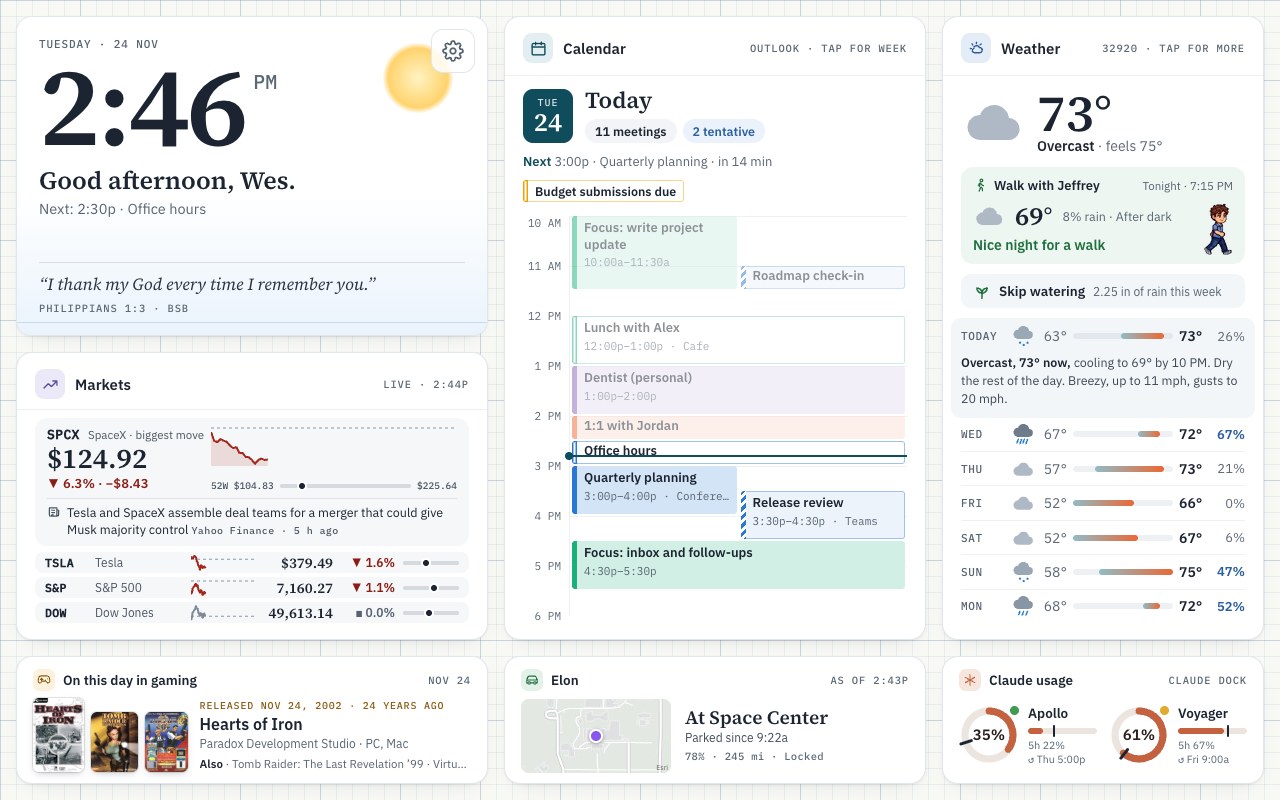
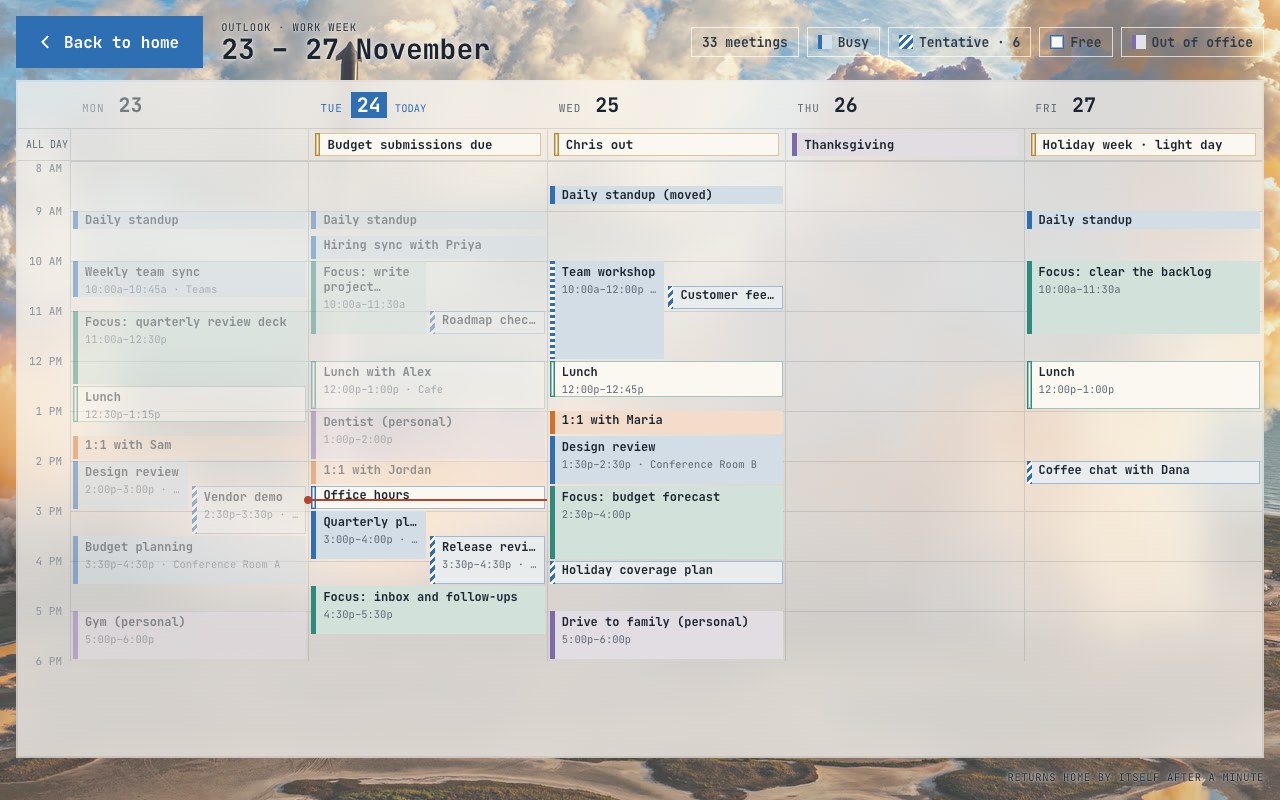
Tap for more
It is a touch screen. Tapping the calendar opens the work week and tapping the weather opens the full forecast. Any screen but home goes back by itself after a minute without a touch.
No computer attached
One Cloudflare Worker serves the page and answers every request for data. It is on the free plan, which allows 10 milliseconds of processor time per request. That limit shaped most of it.
- Locked
- A workers.dev address is public and this page shows a calendar, so every request needs a key. Without it the Worker answers 404 to everything, as if nothing were there.
- The calendar
- Working out every repeating meeting in a calendar feed took about 270 ms in my tests, 27 times the allowance. So the Worker only trims the feed to the days that matter, about 1.4 ms, and the frame works out the meetings itself on a background thread, so the clock never stalls.
- Fetched once
- The verse and the gaming list are fetched once a day and kept. Weather is kept for ten minutes.
- Updates
- Every build has an ID. The page asks for it every five minutes and reloads when it changes, so a new version reaches the frame by itself.
- From my Mac
- Two tiles do need a computer: my Mac sends the car's reading and my Claude usage, checking once a minute. When it is off those two tiles say so and the rest carries on.
- Slow Wi-Fi
- After a power cut the page loads before Wi-Fi does. Every tile keeps the last good data, says how old it is and tries again.
On the frame itself
The frame ships locked down as a photo app. Wes Bos's photo-frame-dashboard project documents how to get developer access to this model and many others, and I followed its guide one checked step at a time, after backing the whole frame up. Most of what now runs on the frame is that project's work: the kiosk app that opens one page full screen at every boot, a newer browser engine, and fixes so it comes back properly after a power cut.
It sleeps when the room is dark
My addition is a small script that runs on the frame. Every five seconds it reads the light sensor. When the room has been dark for five minutes it switches the backlight off, and when the lights come back so does the screen. A tap wakes it for five minutes. Android never learns the screen went dark, which is why the sensor and the touch screen keep working.
It boots on a rocket launch
The three boot screens are replaced too. The frame starts on a Starship standing on the pad, then plays the launch as its boot animation: 216 frames at 12 a second, 18 seconds in all, with a progress bar under the words.
Built for an old, slow screen
- A browser from 2022
- Even upgraded, the frame's engine is Chrome 106. No color-mix, no nesting, no :has(), and it refuses the four- and eight-digit hex colours Chrome 106 is supposed to accept. Colours are written the long way and every tint is worked out ahead of time.
- No blur, no emoji
- The graphics chip is too weak for live blur, and Android 6 has no emoji font, so emoji are stripped from meeting titles before they turn into boxes.
- One pixel per pixel
- The panel is 1280 × 800 with no retina scaling, so nothing is drawn at double size and every layout is fixed to that width.
- A slow chip
- Heavy work goes to a background thread, and the page reloads itself at 3 AM to clear anything that has built up.
- Old certificates
- The frame doesn't trust some of today's certificate authorities, so the Worker fetches box art itself and hands it over, and the frame never has to talk to those sites.
Make your own
My code stays private because it is wired to my calendar and my home. But nearly everything it stands on is public and well documented. Start with Wes Bos's video and the project's README, then this is the order I would do it in.
Get a frame the project supports. Go by the model on the frame's About screen, not the brand on the box. The same listing can ship different boards.
Follow the start-here guide. It covers backing the frame up and getting developer access, with a check after every step. Stop at the first check that fails.
Replace the photo app and upgrade the browser engine. The engine it ships with is far too old for a modern page. The guide swaps in Chrome 106's.
Install the kiosk app and make it the Home app. It opens one address full screen at every boot and keeps retrying until Wi-Fi is up.
Build your page for 1280 × 800 and Chrome 106. Set your bundler's targets the way the builder's guide says, or newer CSS will quietly break.
Host it somewhere that is always on. I use a Cloudflare Worker on the free plan, with KV for the few things it has to remember. Mind the 10 ms of processor time per request.
Point the kiosk at your page. Save the address once. Give your page a version check and it will pick up new deploys by itself.
Optional: make it boot reliably. The project's boot fixes give the frame one Wi-Fi address and the right time after a power cut.
Optional: your own boot screens. Three images to replace. Follow that doc's cautions closely, because a bad write here can damage the frame.
Where my data comes from
- Weather, the walk and the sprinklers: Open-Meteo, free and with no key.
- Gaming history: Wikidata's query service, with box art through Wikipedia's API.
- The verse: the Free Use Bible API, serving the Berean Standard Bible, which is in the public domain.
- The calendar: a published calendar link, read with ical.js.
- Sunrise and sunset: the maths from SunCalc.
- Markets come from an unofficial Yahoo Finance endpoint, so there is no manual to point you at.