ThemeLight, dark, or match your computer.The sun is light, the moon is dark, and the middle one follows your computer's setting. Your choice is saved in this browser.Now: Match my computer
Design system
How wesleybard.com is built.
The site wears the same design system as the tools I build at work: one set of colours with a dark twin for each, three typefaces, and a handful of building blocks. Everything below is drawn with the site's own styles, so switching the theme at the top shows both. One stylesheet, app/design-system.css, carries all of it.
Colour
Colours are used by name only: var(--accent), never #0f4c5c. Each token has a light and a dark value, shown under its name. Text on an accent fill uses --on-accent, never white.
Surfaces
--bgThe page#f4f6f8 · #10161c
--paperCards, prints, the header and footer#ffffff · #171f27
--tm-ledTime Machine: the red LED date readout#ff5a3c · #ff5a3c
--tm-paperTime Machine: the newspaper clipping paper, light edge#f6f0df · #f6f0df
--tm-paper-2Time Machine: the newspaper clipping paper, shaded edge#ece3cb · #ece3cb
--tm-paper-inkTime Machine: ink on the newspaper clipping#26211a · #26211a
--tm-kickerTime Machine: the red dateline above the lead story#7a2e1c · #7a2e1c
--tm-cassTime Machine: cassette shell for the song tape#2b2b33 · #2b2b33
--tm-ticketTime Machine: movie ticket stub paper#ffcf4d · #ffcf4d
--tm-ticket-inkTime Machine: ink on the movie ticket stub#3a2a00 · #3a2a00
--tm-cass-stripeTime Machine: the pink stripe on the cassette label#e94e77 · #e94e77
--tm-cass-inkTime Machine: label text on the cassette#f1f1f1 · #f1f1f1
--tm-cdTime Machine: CD disc, cool edge#dfe6f5 · #dfe6f5
--tm-cd-2Time Machine: CD disc, pale sheen#f6ecff · #f6ecff
--tm-cd-inkTime Machine: label text on the CD#1d2030 · #1d2030
--t8-myTop 8: the MySpace-blue header bar on each box#336699 · #2b5580
--t8-my-inkTop 8: text on the MySpace-blue header bar#ffffff · #ffffff
--t8-linkTop 8: MySpace-blue underlined game names#2a5a8c · #8fbbe8
--t8-my-softTop 8: empty Friend Space slots and hovered search results#e8eef6 · #1d2a3a
--t8-hotTop 8: the orange rank badges and the replace-mode outline#c2410c · #c2410c
--t8-hot-inkTop 8: numbers on the orange rank badges#ffffff · #ffffff
--t8-okTop 8: the Accept button on friend requests#237a46 · #237a46
--t8-ok-inkTop 8: text on the Accept button#ffffff · #ffffff
--t8-xTop 8: the dark disc behind each slot’s ✕ remove buttonrgba(0, 0, 0, .72) · rgba(0, 0, 0, .72)
Type
Geist Serif for the name, headings, tile names and figures; IBM Plex Sans for text; IBM Plex Mono for eyebrows, captions, tags and the subtitles under tile names. Geist Serif comes in one weight, so headings stand out by size, not boldness.
Name · serif 58Wesley Bard
Section · serif 26Explore projects
Tile name · serif 20Knobdeck
Figure · serif 24Lockheed Martin
Text · sans 15A desk controller on a round touchscreen you turn.
Eyebrow · mono 11THE PALS
Caption · mono 11wbuf81/esp32-knobdeck
The header
Paper bar with a bottom rule, one row at every width: the wordmark (Bard in the accent), which is the link home, then Connect, which lands on the footer of whatever page you are on, and the theme switch, the same three-way pill as the work tools: light, match my computer, dark. The choice is saved in this browser and applied before the page paints, so it never flashes. On a phone the switch is hidden, so it is the name and Connect. On the homepage the header stays on screen; everywhere else it scrolls away, because the SNES and health pages stick their own menus to the top. It carries no other links: a page's own menu goes first in <main>, never up here. It's live at the top of this page.
The band
A tinted strip the width of the page, with the pressed item a raised paper key, and it slides sideways within itself on a phone. HealthNav and SnesNav are their pages' menus, first in <main> and stuck to the top.
The project filter
The homepage's list has no band. Under the highlights row, in the page's column, ProjectFilter puts an Explore projects heading in the size of a section heading, then a chip per filter: All (pressed to start) and each category, with its emoji and its count. The chips are outlined on paper, the pressed one filled in ink, and on a phone they wrap so all seven show. A press shows only that category in the one grid below, newest first. All leaves out the highlight cards, which sit just above, though its count still includes them; a category shows them as ordinary tiles. Two categories open with a note above the grid: Work, with a link to how the pals work, and Gaming, saying the games are private builds. The others have none. The address keeps the choice (/#work, /#games …, and /#projects for All), so a link can open a category. Once the chips have gone up under the header, a slim bar fixed just under it carries the same chips a size down in one row, sliding sideways on a phone with a fade at its edge; it goes again above the chips or past the list, and the page never moves when it comes or goes. This is the resting control, held still: its chips do nothing here.
Explore projects
The footer
Paper with a top rule, so the graph paper ends cleanly above it: the name, a Beyond work line, Explore (Projects, SNES History, Design system) and Connect, then the year and Back to top over a thin rule. The header's Connect lands here. It's live at the bottom of this page.
Building blocks
The page
Graph paper: a faint 24px grid in --grid under every page on the system, scrolling with it. Cards, prints, the header and the footer are solid, so the grid only shows in the space between them, as it does around this card.
Buttons, tags and chips
Private repoHighlightLatestClaude Code sessions
The stat strip
Then
Lockheed Martin
Engineer
Now
Newfold Digital
Governance, Risk & Compliance
Still
Building stuff
Ten builds at work, fifteen at home
A print
A photo on a paper border with a wide bottom lip and a mono caption, held on with tape and tilted by hand. The tilt and tape come by position from two lists in lib/projects.ts, so a row looks scattered whatever moves. Photos stay in full colour.
OSCARBernese mountain dog
Tiles
A print standing over the top of its card, four across on a wide screen. Every project is the same tile, one entry in lib/projects.ts. On the homepage the category sits over the name, in the eyebrow style, and pressing it shows only that category. Then the name and its badge, a mono subtitle, and a line or two on what the thing does and what it runs on.
The footer names the board it runs on, with its picture, or else what it's written in. Then one link, by the badge. Open source links its public repo, GitHub →, in a new tab. A build that lives on this site, or has a write-up here, links that page in the same tab, in the words of its cta (How I built it →, About the game →, How they work →; Explore it → when there is none). A Private repo tile links only to its write-up, or nowhere, never outside the site; a Private build links its page under /games/. The project tests hold all of it.
The grid runs newest first by each project's added date, the day it went on the site, which is never shown. A new project gets today's date and lands first. Tilt and tape still go by position, so the rows look hand-placed whatever moves.
LUCYPit and lab mix
LUCY
Private repo
Litigation Utility for Conflicts on Your Brand
Polls a domain-name watch service every couple of hours for newly registered look-alike domains, works out which brand in the portfolio manages each one, and emails Legal a digest with Take action and Dismiss buttons — then follows every actioned domain until it's gone.
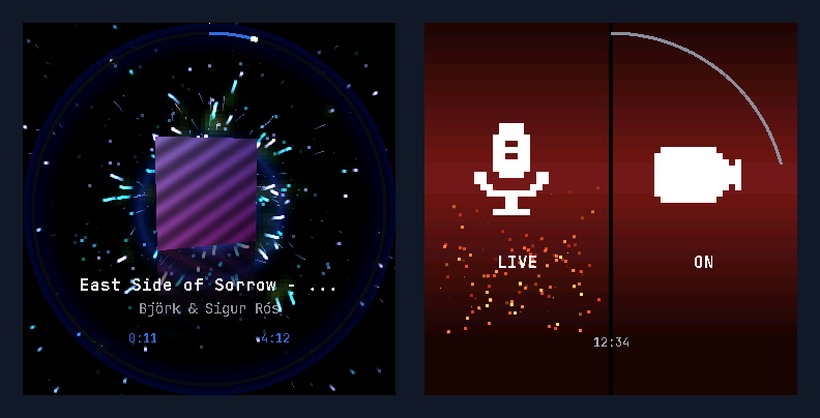
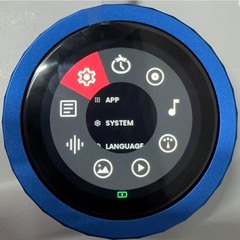
A desk controller on a 360×360 round touchscreen you turn. It plays your music behind seven beat-reactive visualisers — and the moment a Teams call starts, the screen becomes your mic and camera as two giant buttons: red means you are on air, tap a half to toggle it.
A game's tile can hold its trailer in place of a picture. It starts muted once half of it is on screen, and loops. A click on it or Turn sound on gives it sound; scrolling away pauses it and mutes it again. A visitor who asked for reduced motion or data saving gets the poster and a Play button, never an autoplay. Pause is always there, because anything that moves by itself for more than five seconds needs one. The video loads nothing until it is in view. While it holds a trailer the print is not a link: the tile's footer goes to the game's page. A game gets one by carrying a trailer in GAMES.
Trailer
CON AIR
Private build
A one-button flying game for the Game Boy Advance
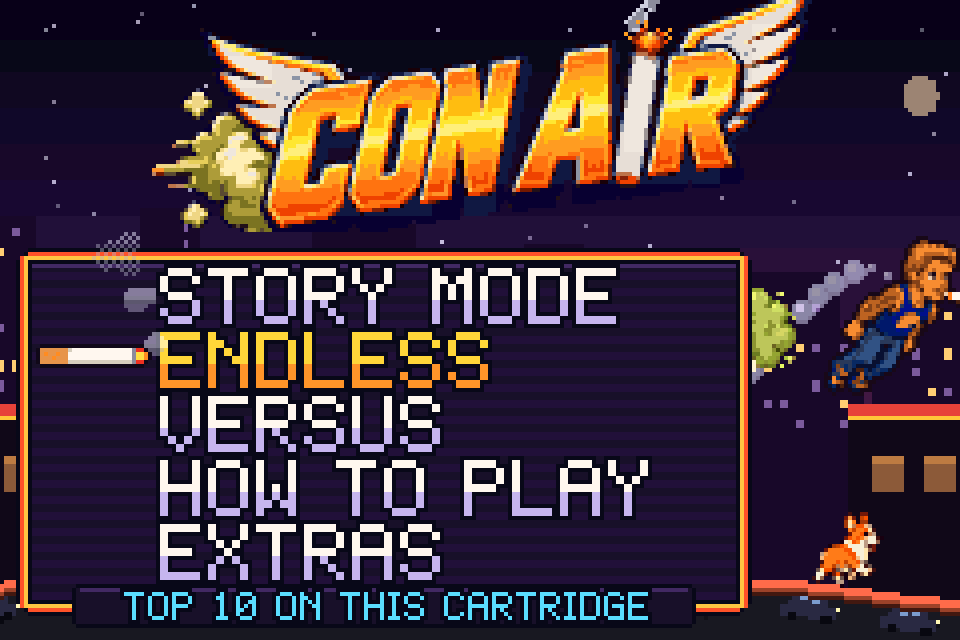
Hold A to rise, let go to fall. Connie has put the house on the Jaguars winning the Super Bowl, and he stays in the air until the bet comes in. Five story levels, an endless mode that gets harder every lap, and a versus mode where friends pass one handheld around. It runs at 60 frames a second on real hardware and saves to the cartridge.
TrailerPrint also works on its own, for a clip with no sound track, like the photo frame's boot animation below. sound={false} drops the sound button, and a click on the picture plays or pauses it. label is the caption's left-hand words, and the trailer's width and height are the video's own size, so it keeps its shape while it loads. off stops it, muted, when the homepage filter leaves its tile out; it starts again once the tile is back on screen.
The boot animation
The highlights row
The top of the homepage: a row of builds I pick. Each is a print over its card, a size up from the tiles, with a button. HIGHLIGHTS in lib/projects.ts is the whole row, in order. LATEST names the one card that wears the filled Latest tag and a strip from a label maker on its print; it can be any card in the row. The row always shows, whatever filter is pressed. With All pressed the grid below leaves its cards out; a category shows them as ordinary tiles. A card with a trailer shows its still picture here, so the three prints stay one height. Under 900px the cards stack.
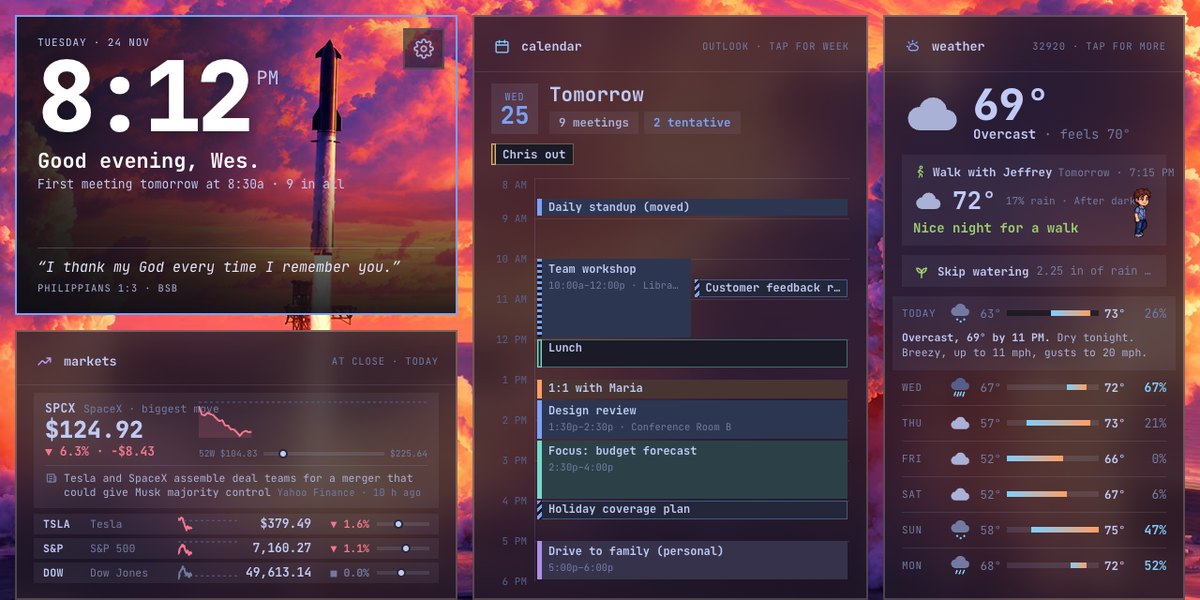
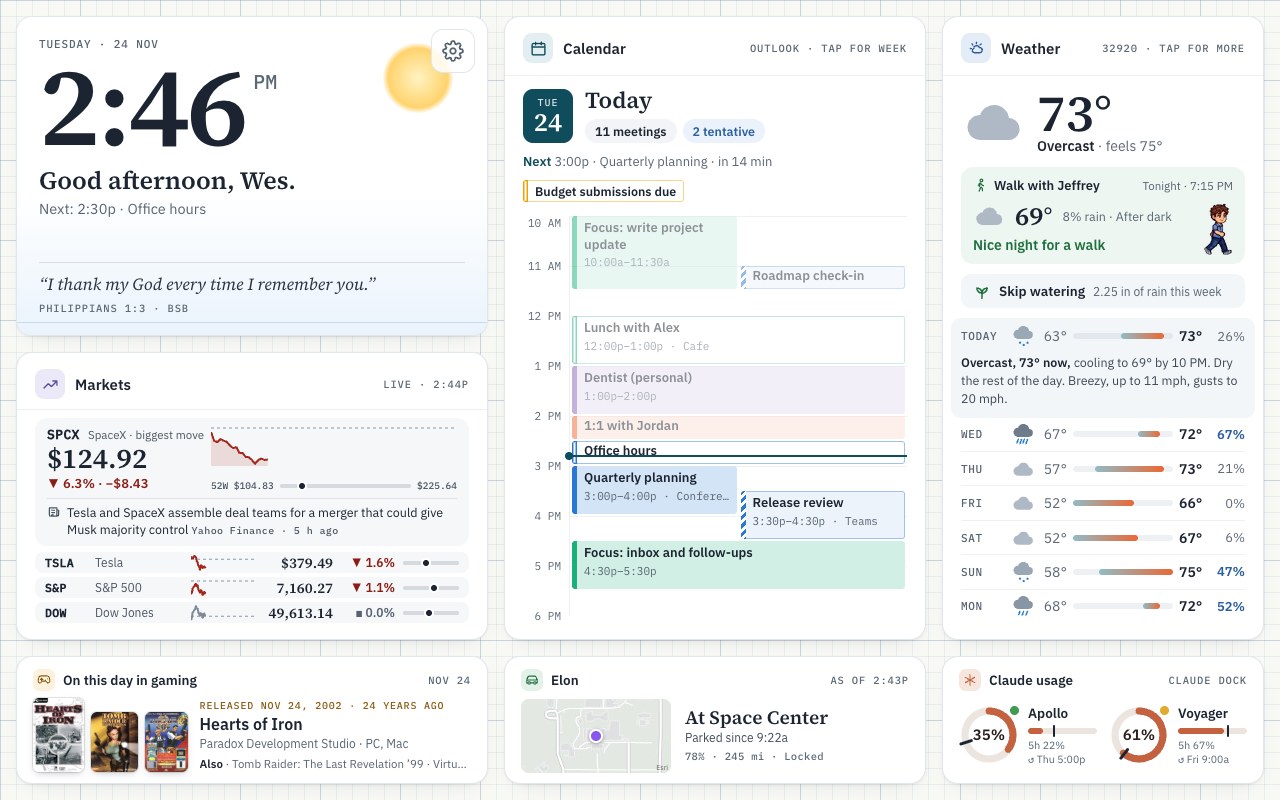
A 10.1-inch Wi-Fi photo frame, opened up and given a new job: my calendar, the weather, the markets, where my car is and my Claude usage, in three looks and one that follows the sun. A Cloudflare Worker serves it, so no computer has to be on.
Hold A to rise, let go to fall. Connie has put the house on the Jaguars winning the Super Bowl, and he stays in the air until the bet comes in. Five story levels, an endless mode that gets harder every lap, and a versus mode where friends pass one handheld around. It runs at 60 frames a second on real hardware and saves to the cartridge.
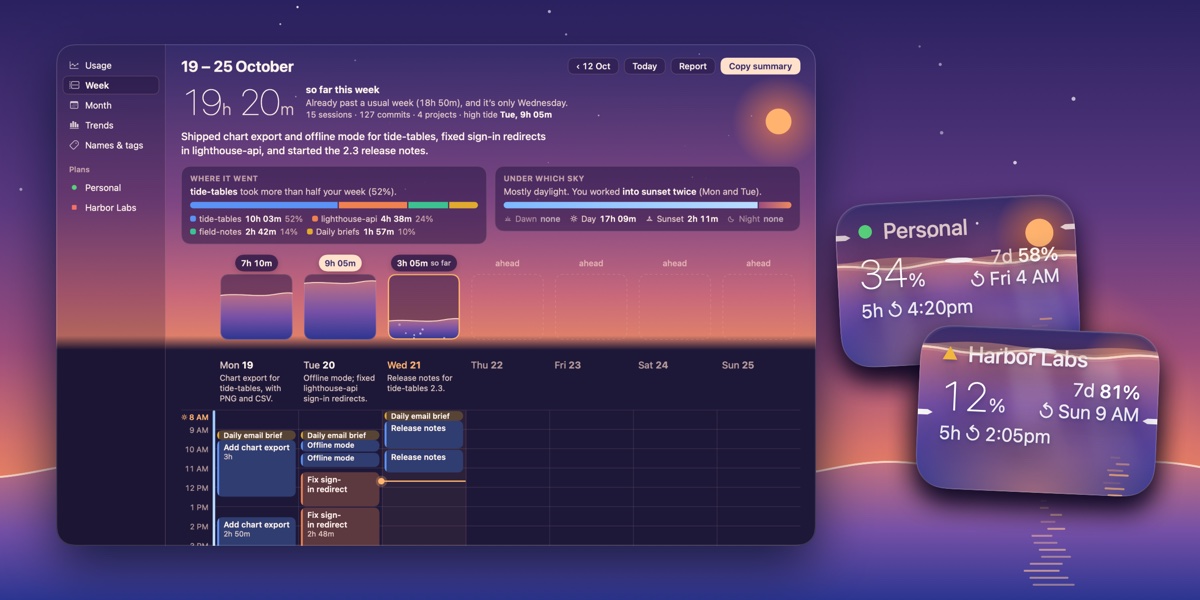
Your week with Claude Code and your plan's limits, at the edge of the screen: a tide for each plan beside the Dock, a battery for each in the menu bar, and a calendar of the week's sessions and commits that writes your weekly report. Swift.
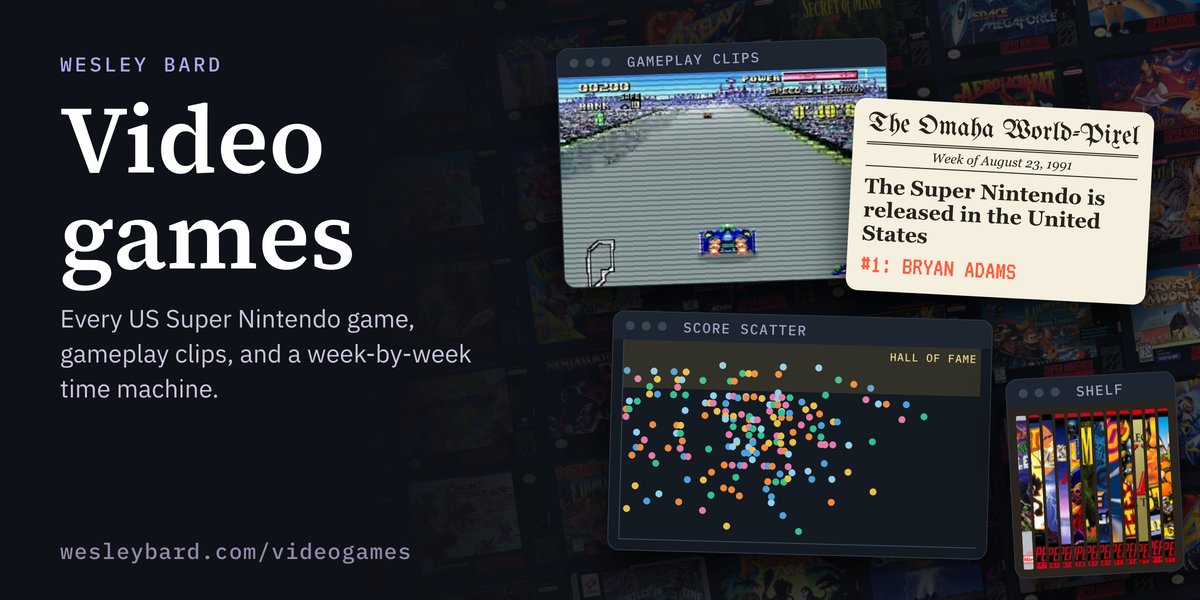
A playable history of the Super Nintendo in America: all 717 US releases on a month-by-month timeline, cover wall, shelf and score scatter, with box art, magazine scores and gameplay clips. A week-by-week time machine shows what was on the radio, at the movies and in the news when each game came out.
Tetris on a dark screen, with Score and Lines beside it. It plays itself in greys until someone presses Play, then takes the arrow keys and space, and only then.
A page about one build, for when the build itself can't be shared: a game at /games/<slug>, a build whose repo stays private at /builds/<slug>, or the work tools at /work. It opens on a hero with an untilted print beside the name, then a facts strip, sections of prints, notes and steps, and a closing card. See CON AIR, Photo Frame Dashboard and The pals.
The recipe
Make app/games/<slug>/page.tsx or app/builds/<slug>/page.tsx. Its pictures go in public/games/<slug>/ or public/builds/<slug>/, served from here and never hotlinked.
Import app/games/games.css, and for a build app/builds/builds.css after it. Render <Nav theme />, then <main className="wb wb-page gm"> (wb wb-page gm bd for a build), then <Footer />. Inside main, one .wrap holds everything.
Blocks only this page needs go in a stylesheet beside it, named by a prefix of its own the way /work has work.css and wk-…, with that class on main too. Tokens only, every selector under .wb.
Each part is a section.sec with its h2 in a .sec-h, and a p.gnote to open it. The page has one h1, the build's name.
Export metadata with a title (“Name · Wesley Bard”), a description, robots: { index: false, follow: false }, and openGraph and twitter (summary_large_image) that name a card. A child route's openGraph replaces the site's images, so the card is always named: the page's own, public/og-<slug> as a PNG or JPEG (never SVG), or the site's default from app/layout.tsx, as /work does. Leave the page out of public/sitemap.xml. /work is the one write-up that search engines may find: it has no robots line and is in the sitemap.
Write __tests__/<slug>.test.tsx, like games.test.tsx, builds.test.tsx and work.test.tsx: one h1; the metadata, the card existing in public/, and no sitemap entry; every picture with its alt text and size; every outside link on an allow-list and opening in a new tab; nothing private by its shape (a ROM, a private repo's address, an email); the stylesheet tokens-only and under .wb.
Link it from the homepage: the project's entry in lib/projects.ts gets the page as its href and the link's words as its cta. Its tile then goes there in the same tab. The page's closing card links back to the homepage; an address like /#games or /#work lands with that category pressed.
The hero
The homepage's .hero: an eyebrow (category, what it runs on, the year), the name as the h1, and the lede, beside one print that isn't tilted, held by one strip of tape across its top (gm-trailer for a video, bd-hero for a screenshot). When some of the pictures are made up, a p.fine under the lede says which parts, and that the rest is real.
The facts strip
The homepage's .stats with four cells: a mono key, a figure and a line under it. On a write-up it goes four across, two by two under 1100px and one under 480px, so it never leaves an empty cell. Every figure is checked against the build's code before it ships.
The frame
PF1007L
a 10.1-inch touch screen sold under several brand names
Screen
1280 × 800
one pixel per pixel, so every screen is drawn for exactly this
Runs on
Android 6
with its browser engine upgraded to Chrome 106
Served by
Cloudflare Workers
the free plan, no computer attached
Screenshots
A screenshot is a print in its own shape, not the system's 2:1: 3:2 for a Game Boy Advance's screen, 16:10 for the photo frame's. The page's stylesheet sets the shape for every print on it, and each img carries its real width and height so the room is held while it loads. Where the text in a picture is small, the print is a link to the full-size file, in the same tab. Rows of prints sit in gm-grid: three across (five for five), two under 860px, one under 480px. They take their tilt and tape by position, counting down the page, from placement.
Point the kiosk at your page. Save the address once. Give your page a version check and it will pick up new deploys by itself.
The flowchart
bd-flow…: how something works, for a reader who doesn't build things. Three stages joined by labelled arrows, with a strip underneath for what happens next time round. It is HTML and CSS, not a picture, so every word is real text that reads on a phone and to a screen reader. Side by side on a wide screen; at 980px and under the stages stack and the arrows point down, labels beside them.
The markup: a figure.bd-flow with an aria-label, holding an ol.bd-flow-stages of three li.bd-flow-stage (bd-flow-from, bd-flow-cloud, bd-flow-wall), each a p.bd-flow-label and a .bd-flow-body. A box is .bd-flow-box with an h3 and either a dl.bd-flow-rows or a ul.bd-flow-points; the middle one adds bd-flow-hub and a p.bd-flow-lead. A box with an arrow out of it sits in a .bd-flow-feed with its .bd-flow-conn. Up to two source boxes, numbered bd-flow-feed-1 and -2, so a phone shows both boxes before both arrows. The strip is .bd-flow-loop. Keep the words plain. This one is cut down from Photo Frame Dashboard; The pals has one with a single source box.
1 · Where it comes from
Out on the internet
The weather
Open-Meteo
The markets
Yahoo Finance
The Worker fetches these and keeps a copy
On my Mac
Where my car is
Mac Tesla Tracker
My Claude usage
a small usage app
My Mac sends these, checking once a minute
2 · In the cloud
A Cloudflare Worker
One small program that is always on.
Checks for the key. No key, no dashboard.
Answers from its copies, so the frame never waits on a slow source.
The frame asks again every minute or two
3 · On the wall
The photo frame
A kiosk app opens the one page when it boots.
The page draws the seven tiles and works out my repeating meetings.
When I change something
I publish a new version, the Worker starts serving it, and within five minutes the frame notices and reloads itself. Nobody touches the frame.
The roster
A page about several builds shows them with the homepage's own tiles, ProjectTile without its footer, so it carries no link back to the page it is on. The words come from lib/projects.ts, so a tile edit changes both. /work puts its nine three across (wk-tiles), then two, then one.
The animated sprite
Pixel art that moves, like Jeffrey walking across the photo frame's walk card (bd-jeffrey): a sprite sheet stepped through with CSS steps(), drawn with image-rendering: pixelated, with a role="img" and a label. Under reduced motion it holds still on its first frame. Set the sheet on the element's own style, so the bundler never has to resolve it.
The closing card
Every write-up ends on a card gm-note with an h2: what isn't here and why (“Not for download”, “What isn't here”), or the credits (“Credit where it's due”, with bd-credit). It may carry a row of chips for what it was built with, and ends with a .go link back to the homepage.
The SNES kit
The SNES pages under /videogames add their own pieces on top of the system: a dark screen colour for games, a purple for anything SNES, and a few 90s props. They live in app/snes/, styled by app/snes/snes.css (tokens only, every block an s- name under .wb). Below, the pieces that move are the real components; the rest are their real classes.
The SNES menu
SnesNav is the first thing in <main> on every SNES page, stuck to the top: a lavender band, a level below the white site header, where the current tab is a raised white key. Each tab fills the band's 44px height, so it's easy to tap. On a phone the labels shorten to Games, Time Machine and Top 8. Pass current (games, time or top8); game and company pages count as games. The n/8 badge on My Top 8 comes from the saved list, so it appears only in the browser. Anything else that sticks to the top sits below it with top: var(--s-nav-h). Here it doesn't stick.
Game tiles
GameTile: a dark card with the box art, title, publisher and genre. Point at one on a computer and its 12-second clip plays after a moment, with a purple glow and light scanlines; on a phone the first tap plays it and the second opens the game. Chips show the EGM and Nintendo Power scores when there are any, and Day One on the launch titles.
Cover draws a box cover, decorative (its title is said next to it). A game with no art, or a cover that fails to load, gets its initials on a grey card the same shape, never a broken image.
SK
The ★ Top 8 button
Top8Star adds a game to the visitor's Top 8 from anywhere. The tile kind is the 28px star on the tiles above, with a 44px area to press: on a computer it shows when you point at or tab to the tile, on a touch screen it is always there. It is always a sibling of the tile's link, never inside the <a>. The page kind is a labelled button, as on a game page:
When the list is full it asks “Replace which?” with the eight covers. The popover takes focus only once it's on screen; browsers refuse focus on a hidden one.
The toast
One polite role="status" region per page, added to <body> once, swaps its text for each message and clears it after a couple of seconds. The words are fixed: “Added to your Top 8 · n/8”, “Removed from your Top 8”, “Replaced X with Y”. Here it is standing still:
Added to your Top 8 · 3/8
The Top 8 tray
Top8Tray sits at the bottom of the library, game and company pages after the first pick: the eight slots, the count and a link to the Top 8. Folding it away is remembered. While it shows, the page's end makes room for it. It is never on the Top 8 or Time Machine pages, which have their own. It shows nothing until something is picked: pick a game with any ★ above to see it here.
Filter chips and toggles
The library's controls are .s-toggle: mono, 32px tall (44px on touch), purple when on. The genre key uses the seven --snes-f-* colours, the same as the scatter's dots.
Heatmap cells
.s-heat-cell with a level l1–l4 from --snes-h1 to --snes-h4, darker for busier months; an empty month has no level, and months before the launch are dashed (is-pre). Two real years:
JFMAMJJASOND
1991581108
199411151120121951617294820
Instruction booklet bits
A game page reads like the game's manual: .s-booklet on the warm --booklet paper with a stitched edge, the site's mono eyebrow, then .s-bchip chips for genre, players, rating and chip. Day One is the purple one.
Instruction booklet · August 23, 1991
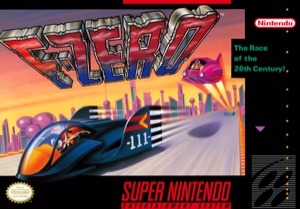
F-Zero
Racing1 playerDay OnePre-ESRB
The Omaha World-Pixel
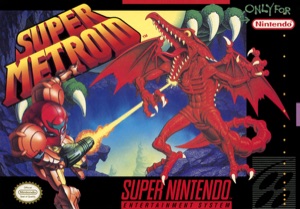
Paper is the week's news as a newspaper clipping, the lead story as its headline. Its masthead is always “The Omaha World-Pixel”, never the real Omaha paper's name. The Time Machine shows it full size; compact drops the side column. This is the week Super Metroid came out:
Vol. 4 · No. 139Omaha, Nebraska · Late edition25¢
The Omaha World-Pixel
Week of April 15, 1994
Apr. 16
1994 Popeyes shooting: Two robbers shoot and kill three employees at a Popeyes restaurant in Gadsden, Alabama. The gunman is arrested and executed in 2017.
Apr. 19 Rapper Nas releases classic album Illmatic.
Be Kind, Rewind
BeKindRewind closes each game page: the #1 song, album and movie the week it came out, as a cassette, a CD and a ticket, beside the compact paper and the price, dated, then in today's money. A game known only by its month shows the month.
1994 Popeyes shooting: Two robbers shoot and kill three employees at a Popeyes restaurant in Gadsden, Alabama. The gunman is arrested and executed in 2017.
💵 A Super NES was $199.99 at launch · about $473 today
On the Time Machine's screen each #1 is an .s-tm-card: square art for songs and albums, a poster for the movie, the kind in mono caps, then the title. They link to Wikipedia there; these don't.
#1 songBump n' GrindR. Kelly
#1 albumLonging in Their HeartsBonnie Raitt
#1 movieFour Weddings and a Funeral$4,162,489 weekend
MySpace boxes
The Top 8 builder dresses as an old profile page: .s-t8-box with its blue .s-t8-bh bar, theme chips, numbered slots and friend requests to accept or deny. The picture's wordmark is “snesspace”, never “myspace”. The six themes are drawn in code, and their names carry no game logos or trademarked names. These are still copies; the builder is live on its page.
Edit profile
You have 1 new friend request!
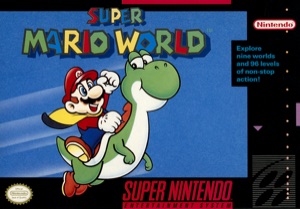
Super Mario Worlda classic to start with · 1991
My Friend Space2 of 8
1F-Zero
2Super Metroid
3Add a friend
4Add a friend
The hub and On this day
The /videogames hub wears the homepage's look: SNES History is the featured build (with its own picture), and the other SNES projects are tiles whose 2:1 prints match the homepage's, both shown under Building blocks above. Under the featured build, “On this day” picks the visitor's date in their own browser, so the static page holds only a same-height placeholder. This is a still of it.
On this day in SNES history
This week in 1994
#1 song Bump n' Grind — R. Kelly
#1 movie Four Weddings and a Funeral
In the news 1994 Popeyes shooting: Two robbers shoot and kill three employees at a Popeyes…
Every SNES page ends with SnesCredit, once. pop adds the chart and box-office sources where Time Machine data shows; cpi adds the note where a price is in today's money.
Data: IGDB · Wikipedia · libretro-thumbnails · Charts: Billboard · Box office: Box Office Mojo via Wikipedia. Today’s money uses US CPI-U, 2025 dollars.
Writing
A tile says what a thing does and what it runs on. Never repo statistics: no line, test or commit counts.
Public copy names no client, vendor, regulator, brokerage or figure: “a domain-name watch service”, not the vendor's name.
Counts are computed from the project lists and spelled out (“nine builds”), so they can't go stale.
The homepage is about the building, not a résumé. Keep the top terse; no taglines.
Plain English, from the reader's side of the screen.
On the SNES pages the newspaper is “The Omaha World-Pixel”. The real Omaha paper's name never appears anywhere.
A price always says when and what kind: “$199.99 at launch in 1991”, “$99.99 in a 1993 catalog”, then “about $X today”. Never “then”.
The Top 8 says “snesspace”, never “myspace”, and its themes use no game logos, ripped art or trademarked game names.
Titles are the US titles as printed on the box.
State the fact and stop. No narration and no captions that explain what the reader can already see.
A write-up never carries a ROM, a download, a save file or a link to a private repo. Nothing private goes in it in any form: not in its words, pictures, tests or scripts. This repo is public, so a test bans a private thing by its shape and never names the real value to ban it.
A picture of something private is made again from made-up data, never a screenshot of the real thing, and a fine-print line under the lede says what was made up.
A page about work says only what has already been approved for it. It names no vendor, client, person or number, and says “the company's single sign-on”, not the product.
Using it on a page
The root layout loads the stylesheet. Put the page in <main className="wb wb-page"> and use the classes shown here, with the shared Nav and Footer.
A new colour goes in the stylesheet, light and dark, and in TOKENS on this page, or the tests fail.
One menu per page. A page with parts of its own puts its band first in <main>: HealthNav or SnesNav. The menu never goes in the header, which carries Connect and nothing else. Only the homepage's header stays on screen (<Nav theme sticky />), with the projects' slim bar under it at var(--head-h).
Every card shows. Nothing is folded away behind a toggle, a drop-down or a More link; a filter may narrow a list, but it starts on All.
A list of builds runs newest first, by added. A story, like the health change log, may run oldest first.
A page reached from a project tile follows the write-up recipe above, and its tile links it through href and cta.
Every block is scoped under .wb, so pages with their own look are untouched.
A write-up imports app/games/games.css, and app/builds/builds.css for a build, and adds gm (and bd) to its <main>.
An SNES page also imports app/snes/snes.css, starts <main> with SnesNav and ends with SnesCredit. Route paths come from lib/snes/routes.ts, never typed by hand.
Anything else stuck to the top of an SNES page sits under the menu: top: var(--s-nav-h).
The display faces in app/snes/fonts.ts go on <main> only on the pages that use them, never site-wide.
Nothing that reads the visitor's saved Top 8 or settings renders on the server: the Top 8 store answers null there, and the star, tray and badge appear after load.
Check both themes and a phone (390 px wide) before shipping.

 LUCYPit and lab mix


 Bump n' Grind
 Longing in Their Hearts
 Four Weddings and a Funeral